

 Self-Hosting
Tour della JetKVM web UI sulla mia LattePanda: virtual media, Wake on LAN e la killer demo — entro nel BIOS dal browser e mostro come reinstallare l'OS da remoto.
 Self-Hosting
Vaultwarden self-hosted homelab: setup completo su Proxmox LXC con Caddy HTTPS, admin panel sigillato e backup testato. Sette decisioni motivate.

1 aprile 2026 · 8 min lettura
Prometheus con 8 job, Grafana, node-exporter su ogni nodo e container, blackbox HTTP probe. E zero alert configurati. Il monitoring che raccoglie tutto ma non ti sveglia quando serve.
Iscriviti alla newsletter per ricevere i migliori articoli direttamente nella tua inbox.
Licence provided by Authentik.
Running a homelab with 14 containers means 14 sets of credentials to manage, 14 places to forget to revoke access when someone leaves, 14 local accounts to keep in sync. SSO is not overkill — it is the only sane approach at this scale.
This post documents how I deployed Authentik Enterprise as the central identity provider for my Proxmox homelab and integrated it with Grafana and Forgejo via OAuth2/OIDC. I will cover the actual configuration files, the errors that blocked me, and an honest assessment of what the enterprise license actually adds.
Authelia does forward auth — it sits in front of your reverse proxy and checks whether a request is authenticated. That is useful but limited. Authentik is a full identity provider: OAuth2, OIDC, SAML, LDAP, SCIM, consent flows, role mapping, impersonation, and a visual flow editor for building custom authentication pipelines. The scope is different.
The enterprise license (which Authentik provided for this setup) adds persistent audit logging, advanced RBAC with multi-condition policies, and the can_impersonate flag — which lets you assume a user's identity to reproduce their exact access context and debug permission issues without asking for their password. In a homelab with multiple collaborators, that capability alone saves significant time. Beyond these, the enterprise tier also includes native Google Workspace and Microsoft Entra integrations, password history compliance checks, CSV user exports, and the ability to embed external OAuth/SAML sources. Full details at the pricing page.
Authentik runs on CT 121 as a Docker Compose stack: server + worker + PostgreSQL 16 + Redis (note: as of authentik 2025.10, Redis has been fully removed as a dependency). Public domain: auth.homelabz.cc , behind Nginx with HTTPS. The host is a Ryzen 7 1800X with 48 GB ECC and ZFS mirror SSD — more than enough. Authentik is reasonably lightweight: the server process alone uses under 400 MB RAM at idle; the full stack with Redis (pre-2025.10) sits around 600–700 MB; since 2025.10, without Redis, the footprint is lower.
The enterprise license enables specific capability flags: can_save_media , can_asn , can_geo_ip , can_impersonate , is_enterprise . These appear in the Authentik admin under System → Licenses and can be verified via API.
Grafana 12.4.1 on CT 103. The integration uses the generic_oauth provider with PKCE enabled — PKCE adds a code_verifier / code_challenge to the OAuth2 flow to prevent authorization code interception. Scopes: openid email profile .
[auth.generic_oauth]
enabled = true
name = Authentik
client_id = <CLIENT_ID>
client_secret = <CLIENT_SECRET>
scopes = openid email profile
auth_url = https://auth.homelabz.cc/application/o/authorize/
token_url = https://auth.homelabz.cc/application/o/token/
api_url = https://auth.homelabz.cc/application/o/userinfo/
use_pkce = true
role_attribute_path = contains(groups[*], 'Grafana Admins') && 'Admin' || 'Viewer'
allow_sign_up = true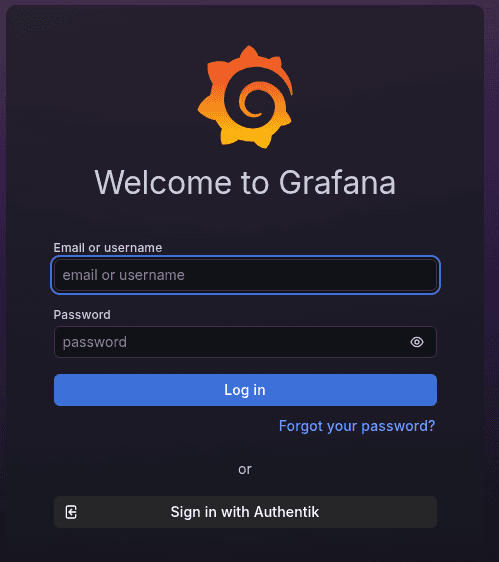
If root_url is not set in grafana.ini , Grafana constructs the redirect URI using localhost as the hostname. Authentik receives http://localhost:3000/login/generic_oauth instead of the registered URI, finds no match in the Application config, and returns a Redirect URI Error. Hard block, cryptic message, no hint in the logs about the actual cause.
[server]
root_url = https://grafana.homelabz.ccThe JMESPath role mapping works exactly as expected: contains(groups[*], 'Grafana Admins') && 'Admin' || 'Viewer' assigns Admin to members of the Grafana Admins group in Authentik, Viewer to everyone else. No per-user configuration — add someone to the group, they get the role. Remove them, they lose it.
Forgejo on CT 106 supports OpenID Connect with auto-discovery, which makes the configuration cleaner than Grafana. Point it at the Authentik discovery URL and the client fetches all endpoints automatically — token, userinfo, jwks.
forgejo admin auth add-oauth \
  --name authentik \
  --provider openidConnect \
  --key <CLIENT_ID> \
  --secret <CLIENT_SECRET> \
  --auto-discover-url https://auth.homelabz.cc/application/o/forgejo/.well-known/openid-configuration \
  --scopes "openid email profile" \
  --auto-register \
  --skip-local-two-fa
The --auto-register flag creates the Forgejo account automatically on first OIDC login. --skip-local-two-fa delegates 2FA entirely to Authentik — which handles it better, with TOTP and push notifications built in.
Forgejo still had the old container IP in ROOT_URL — a leftover from when the container ran on a different address. The result was identical to the Grafana issue: redirect to an unregistered URI, login blocked. Updating ROOT_URL fixed it. Rule of thumb: after any container migration, verify ROOT_URL before configuring SSO.
Third gotcha, less common but frustrating: if you run a reverse proxy in front of Authentik (Caddy, Nginx, Traefik), make sure the X-Forwarded-Proto header is set correctly. Without it, HTTPS redirects break in non-obvious ways — the login page returns blank with no useful error message. The official reverse proxy documentation covers the general requirements and includes a full Nginx example.
The enterprise RBAC goes beyond simple group membership. You can define policies that evaluate multiple conditions simultaneously: group membership AND source IP within the management subnet AND access time within a window. Conditions are combined with AND/OR logic via the Flow editor UI, no code required.
Persistent audit logging is the other enterprise feature worth having in a multi-user environment. Every auth event — successful login, failed attempt, token revoked, consent updated — is recorded with timestamp, user, IP, and application. You get full visibility into who accessed what and when without running a separate SIEM.
Adding a new collaborator now means creating one user in Authentik and assigning them to the right groups. No manual provisioning across services. Revoking access is instant and complete: disable the account in Authentik, that person loses access to every integrated service in one operation.
Our infrastructure runs on NetBird VPN across three subnets — management, backend, Docker. Authentik integrates naturally with this: you can restrict internal application access to users connected from the management subnet, without touching the applications themselves. No custom code, all through the Flow editor.
As a side note: Authentik can also protect a self-hosted analytics dashboard like Matomo on PikaPods via OAuth2 proxy. It is on our list of next steps — centralizing authentication there as well.
Authentik has a genuine complexity problem upfront. The UI is dense, the terminology — Flow, Stage, Provider, Application, Source, Outpost — takes time to internalize, and the documentation assumes some familiarity with OAuth2 and OIDC internals. The first few hours are rough if you are coming in without that background.
The worker is a mandatory separate process — without it, background tasks do not run: emails, expired token cleanup, event notifications. Not a design flaw, but worth accounting for in your Docker architecture.
A central identity provider reduces attack surface but concentrates it. If Authentik is compromised, an attacker has access to everything. The appropriate response: mandatory 2FA for all users, rate limiting on login endpoints, regular updates, PostgreSQL backups on separate storage. In our case auth.homelabz.cc is publicly exposed with HTTPS but protected by mandatory TOTP 2FA and active access monitoring via enterprise audit logs.
The post on ZimaOS and CasaOS vulnerabilities with 22 CVEs is a useful reminder of what happens when homelab software is exposed to the internet without proper maintenance. The same applies to Authentik: version 2025.2 has been in production for two months, and updates must be applied promptly.
Authentik docs: goauthentik.io/docs — Enterprise licensing: goauthentik.io/docs/enterprise — Grafana generic_oauth: grafana.com/docs — Forgejo OAuth CLI: forgejo.org/docs
Authentik is not the path of least resistance. It takes time to configure correctly, requires maintenance, and gotchas like the Grafana root_url issue cost hours the first time. But once in production, access management stops being an operational problem. One user, one login, one place to check. On a homelab with 14 services in production and multiple collaborators, that is worth the initial investment — and the enterprise license adds the features that actually matter as the infrastructure grows.
The community edition is fully free and self-hosted, with all the core features (OAuth2, OIDC, SAML, LDAP, custom flows). Enterprise adds SLA support, RAC and advanced audit logging. My homelab runs an NFR enterprise license received from the Authentik team, but community covers 95% of home use cases.
My Proxmox LXC runs stable at 512 MB with 14 services connected, spiking to 800 MB during LDAP sync or worker restart. A 1 GB LXC is enough; bump to 2 GB if you add many auth backends or complex custom flows.
For apps that support OIDC or OAuth2 (Grafana, Forgejo, Nextcloud, Vaultwarden, Gitea) integration is native and takes a few minutes. For legacy apps without built-in SSO I use Authentik's proxy provider, which injects auth headers in front of the app: this way I covered services that would never have spoken OIDC.